
PaySuite Mobile App User Guide
This comprehensive guide will help you navigate and utilize all features of the PaySuite mobile application for efficient business management.
Quick Access to Features
Dashboard Overview
The Dashboard provides a comprehensive overview of your financial metrics and performance indicators, giving you instant insights into your business health.
Key Financial Metrics
- Total Amount: $7K - Overall revenue generated from all sources
- Total Due: Outstanding payments visualized in charts
- Total Paid: Completed transactions represented in financial charts
- Ticket Overview: Support ticket statistics with customizable filter options
Top Customers Overview
Visual representation of your top customers by revenue contribution:
- Interactive bar chart showing customer performance metrics
- Featured customers: Matthew Anderson, Joshua Jackson, Andrew Harris, Sophia Taylor, Emily Davis
- Revenue range visualization from $0 to $7K per customer
- Quick identification of your most valuable clients
Monthly Performance Analytics
Interactive chart displaying monthly ticket performance trends:
- Monthly ticket counts tracking from January to December
- Peak performance: April with 480 tickets
- Low period: January with 120 tickets
- Comparison metrics: 186 Solved vs 279 Created tickets
- Customizable filter options for detailed analysis
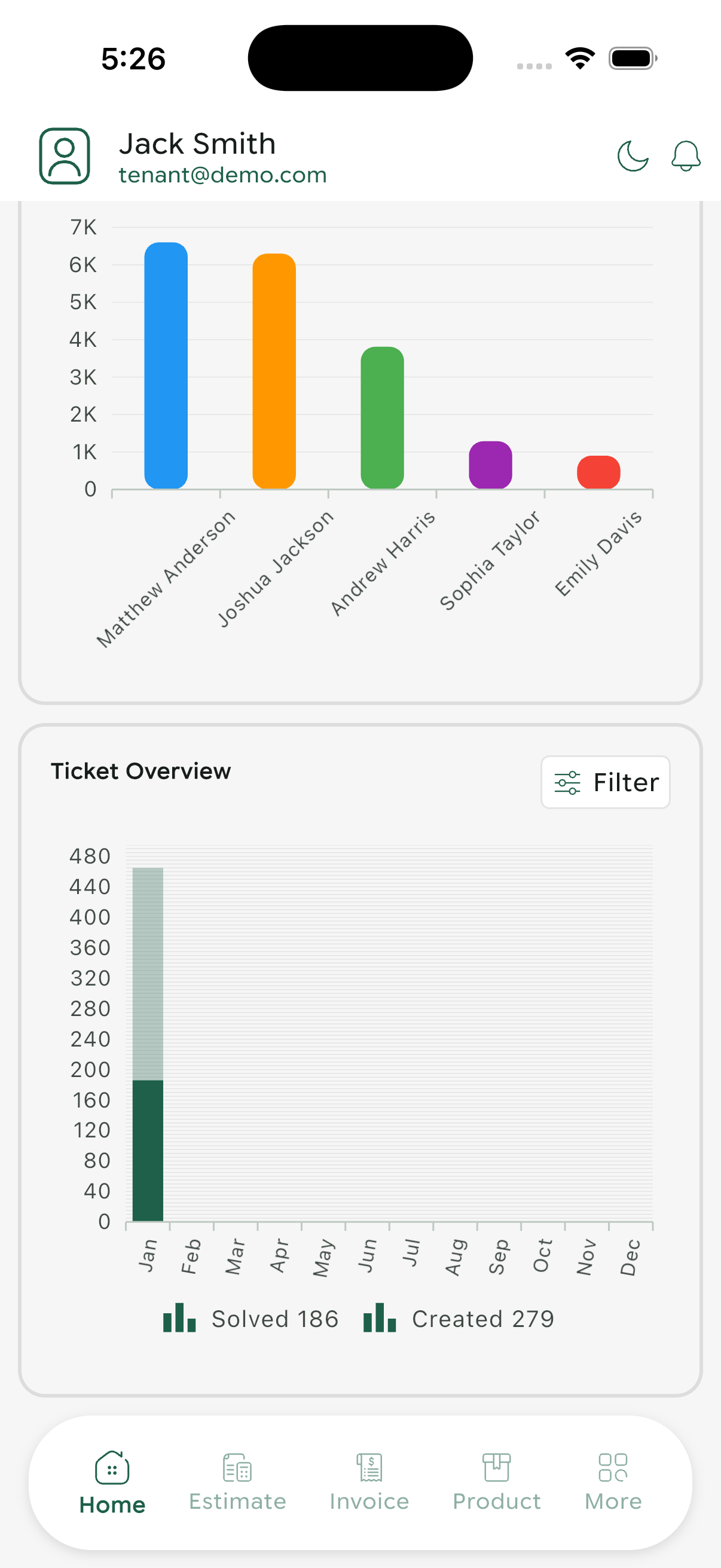
Dashboard overview with financial metrics and performance charts
Use the dashboard filters to customize your view and focus on specific time periods or metrics relevant to your business goals.
Products Management
Efficiently manage your product catalog, track inventory, and maintain pricing information all in one place.
Product List View
Comprehensive product catalog displaying:
- Product Name: Clear identification of each item
- Product Number/ID: Unique identifier for tracking
- Category: Technology, Food & Recipes, Sports, Fashion, Lifestyle
- Price: Current selling price
- Bose SoundLink Speaker - $129.99 (Technology)
- Canon EOS R50 Camera - $849.99 (Technology)
- Philips Air Fryer - $149.99 (Food & Recipes)
Add New Product
Create new products with detailed information:
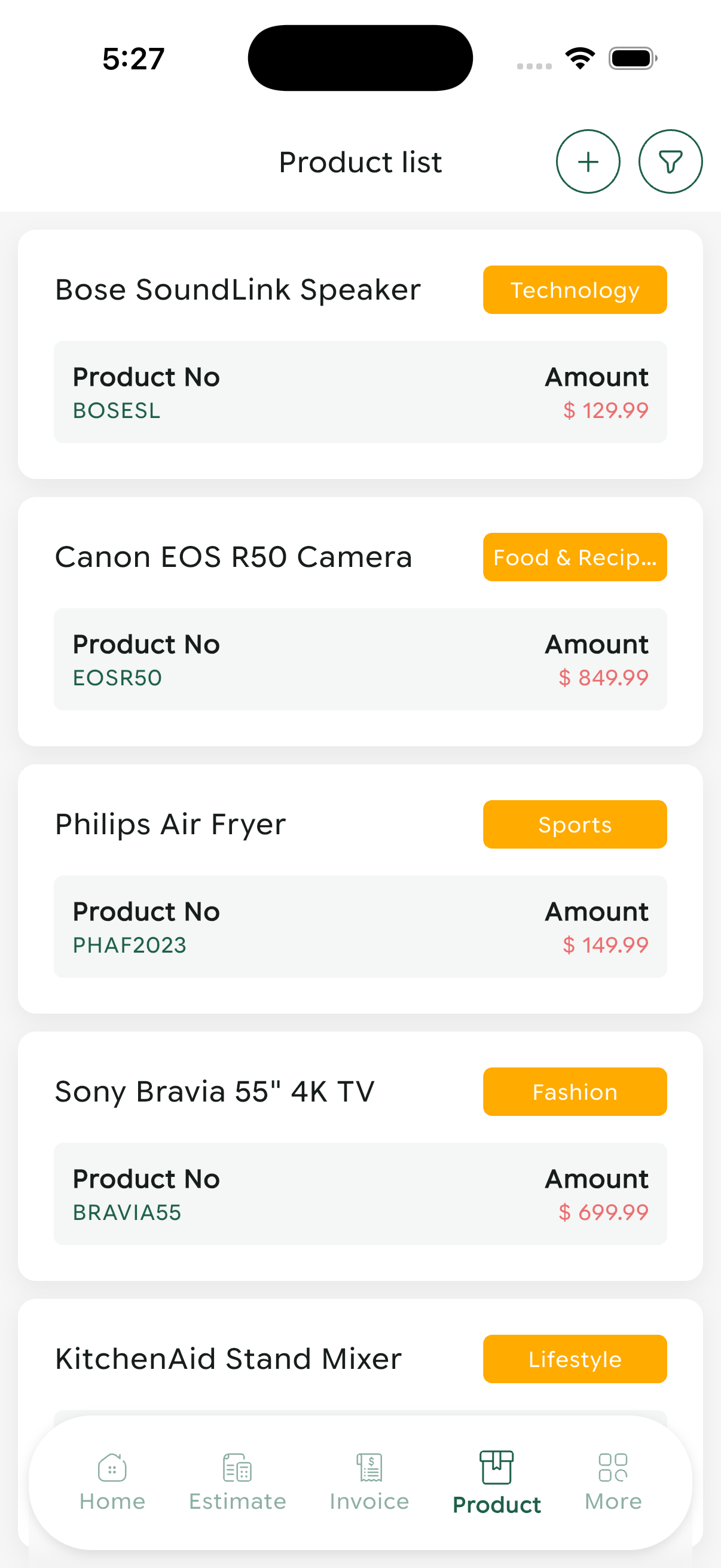
Product catalog listing with categories and pricing
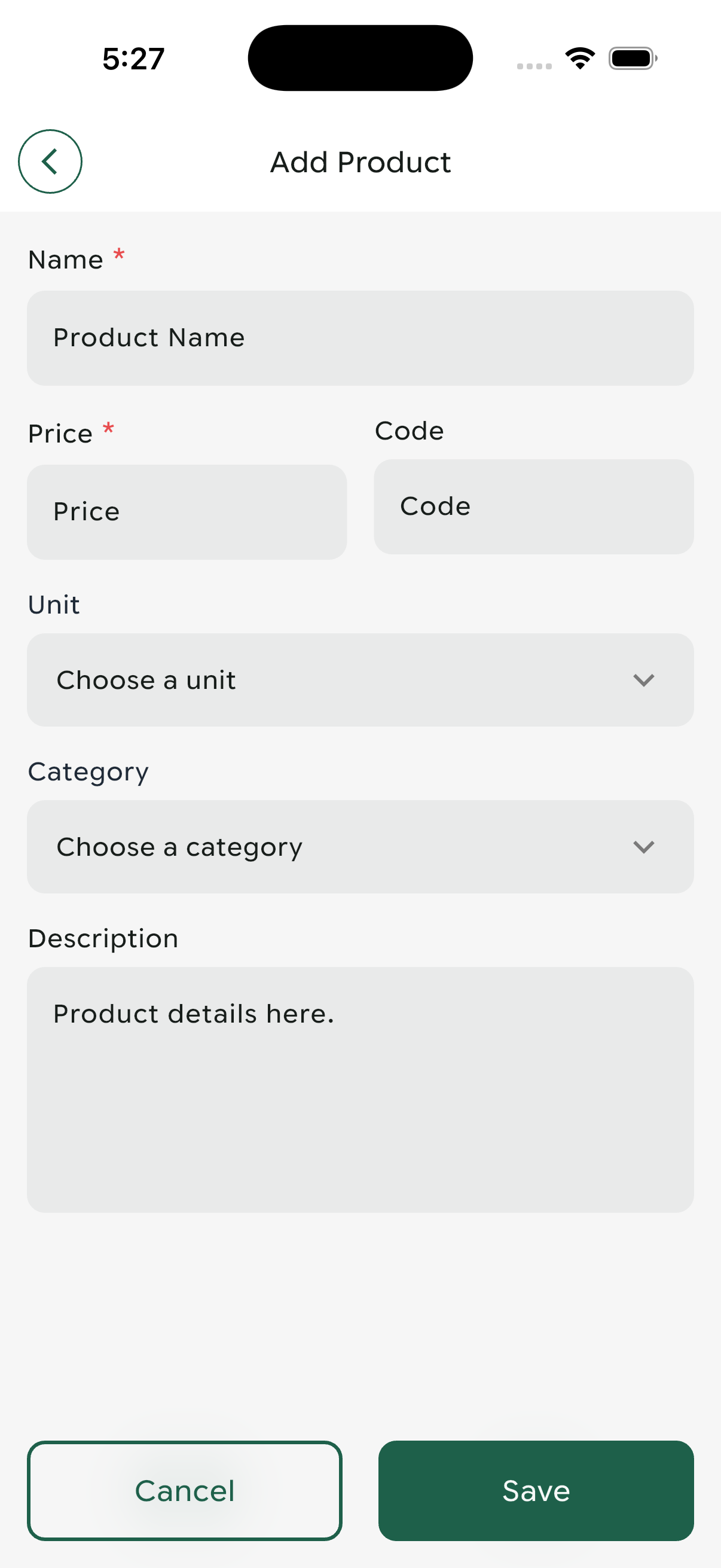
Add new product form with all required fields
Use clear, descriptive product names and consistent categorization to make searching and filtering easier for your team.
Customer Management
Maintain a comprehensive customer database with contact information, company details, and activity tracking.
Customer Directory
View and manage all customer information:
- Profile Initials: Visual identification with colored avatars (JT, EM, AH, MW, JJ)
- Customer Name: Full name display
- Email Address: Contact email
- Status Indicator: Active status badges
- Joseph Thompson Active
- Ella Martin Active
- Andrew Harris Active
- Mia White Active
- Joshua Jackson Active
Customer Registration
Comprehensive form for adding new customers:
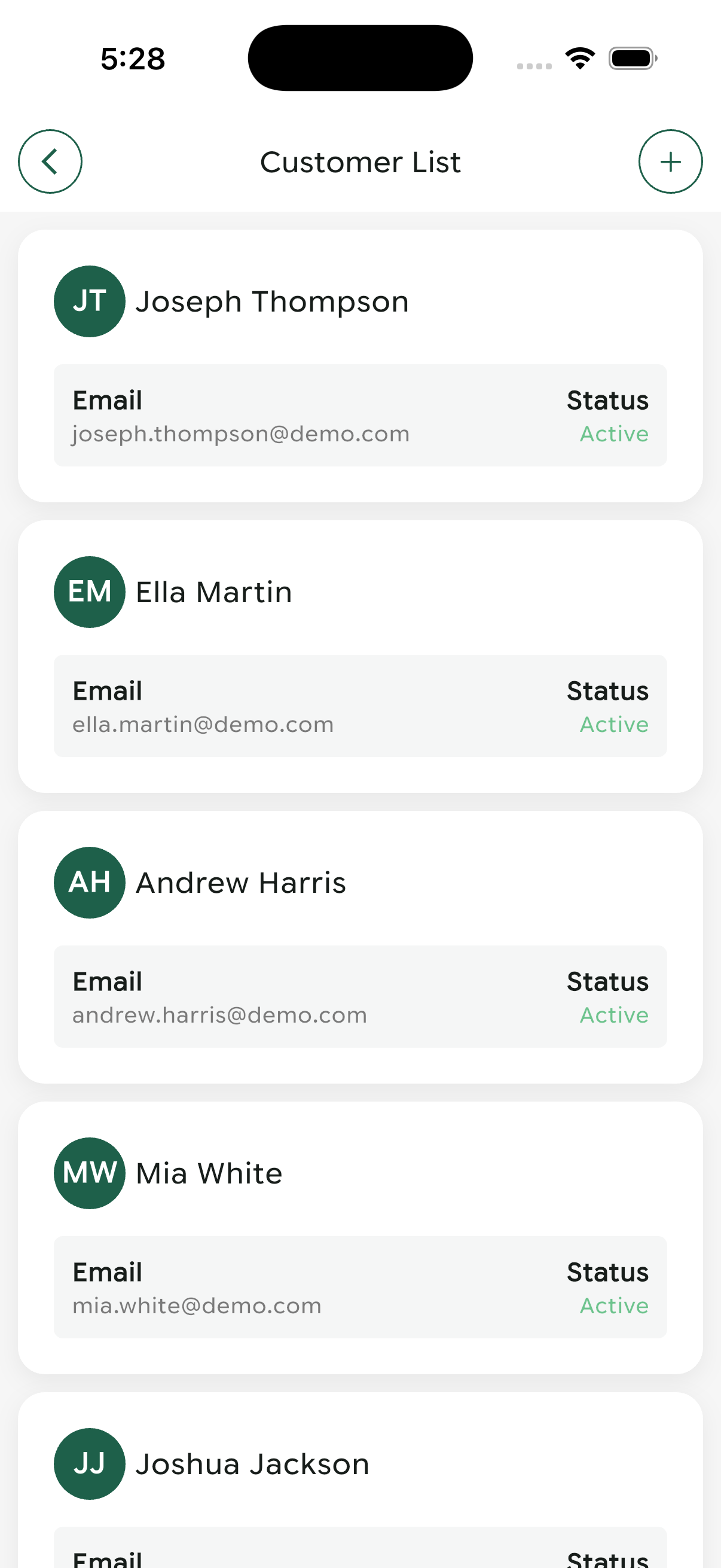
Customer directory with status indicators and contact info
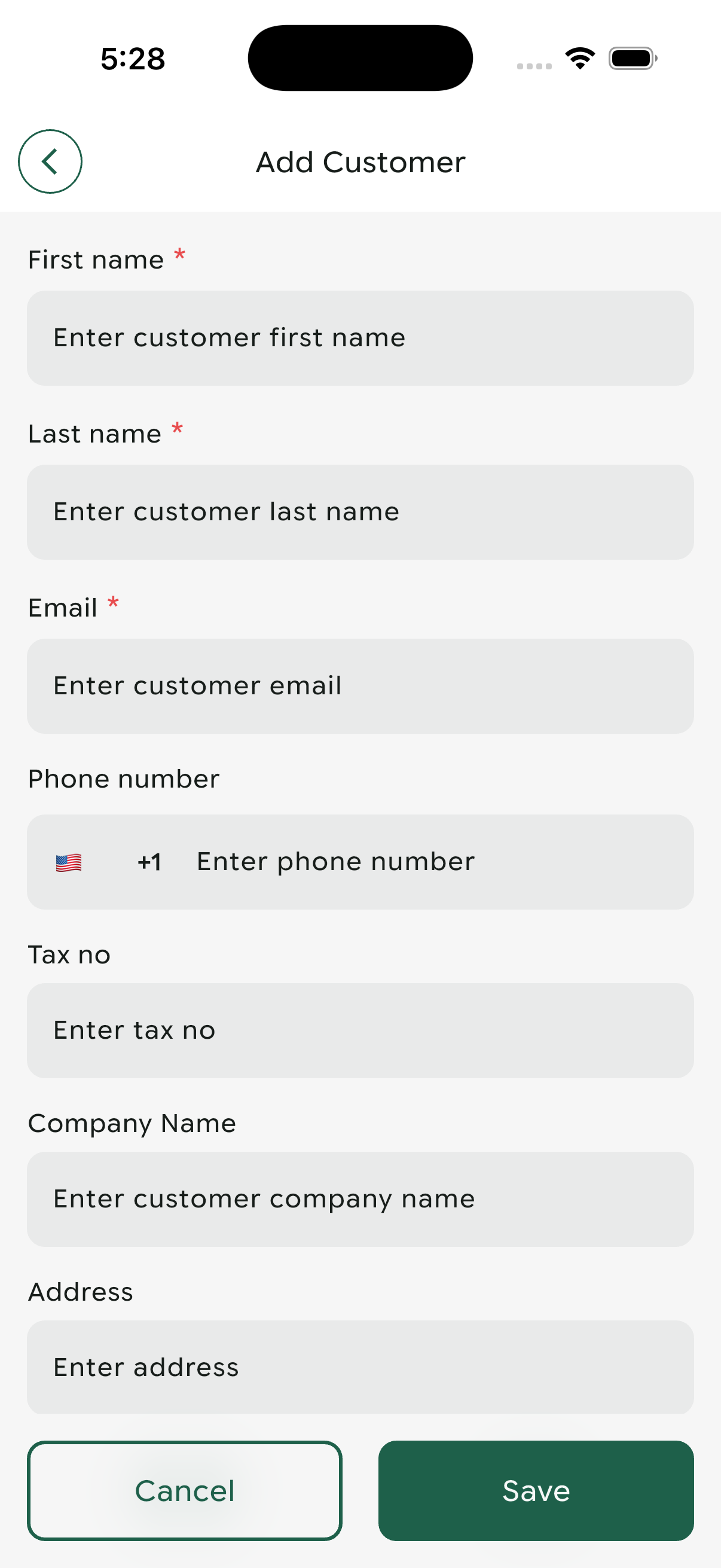
New customer registration form with comprehensive fields
Keep customer information up-to-date to ensure accurate invoicing and communication. Regular data hygiene prevents billing errors.
Estimates Management
Create professional price estimates for potential customers and track their approval status throughout the sales process.
Estimate List & Tracking
Comprehensive view of all estimates with key information:
- Customer Name: Associated client
- Estimate Number: Unique identifier (EST-10015, EST-10014, etc.)
- Creation Date: When the estimate was generated
- Status: Approved Approved or Rejected Reject
- Amount: Total estimated value
- Andrew Harris - EST-10015 - $3,085.47 Approved
- Daniel Miller - EST-10014 - $2,034.98 Approved
- Sophia Taylor - EST-10013 - $1,635.96 Reject
- David Johnson - EST-10012 - $1,516.96 Approved
Create New Estimate
Step-by-step estimate creation process:
- Select Customer: Choose from existing customer database (Required)
- Set Date: Estimate creation date (Required)
- Choose Template: Select professional design template (Required)
- Add Products: Select products/services to include (Required)
- Apply Discount: Set discount type and amount (Optional)
- Review Subtotal: Automatically calculated before tax
- Configure Tax: Add applicable tax rates
- Verify Grand Total: Final amount including all adjustments
Save: Save estimate as draft | Save & Send: Save and email to customer immediately
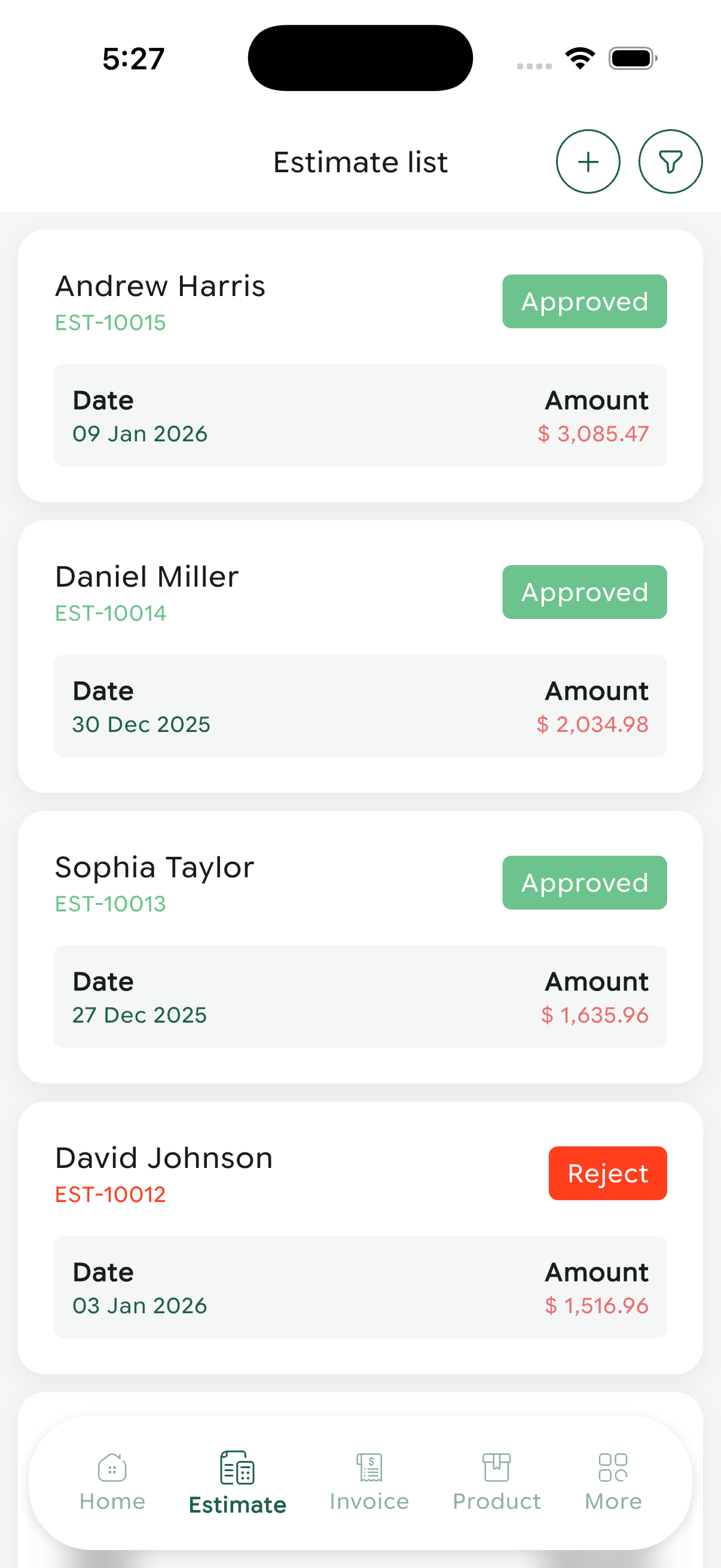
Estimates overview with approval status and amounts
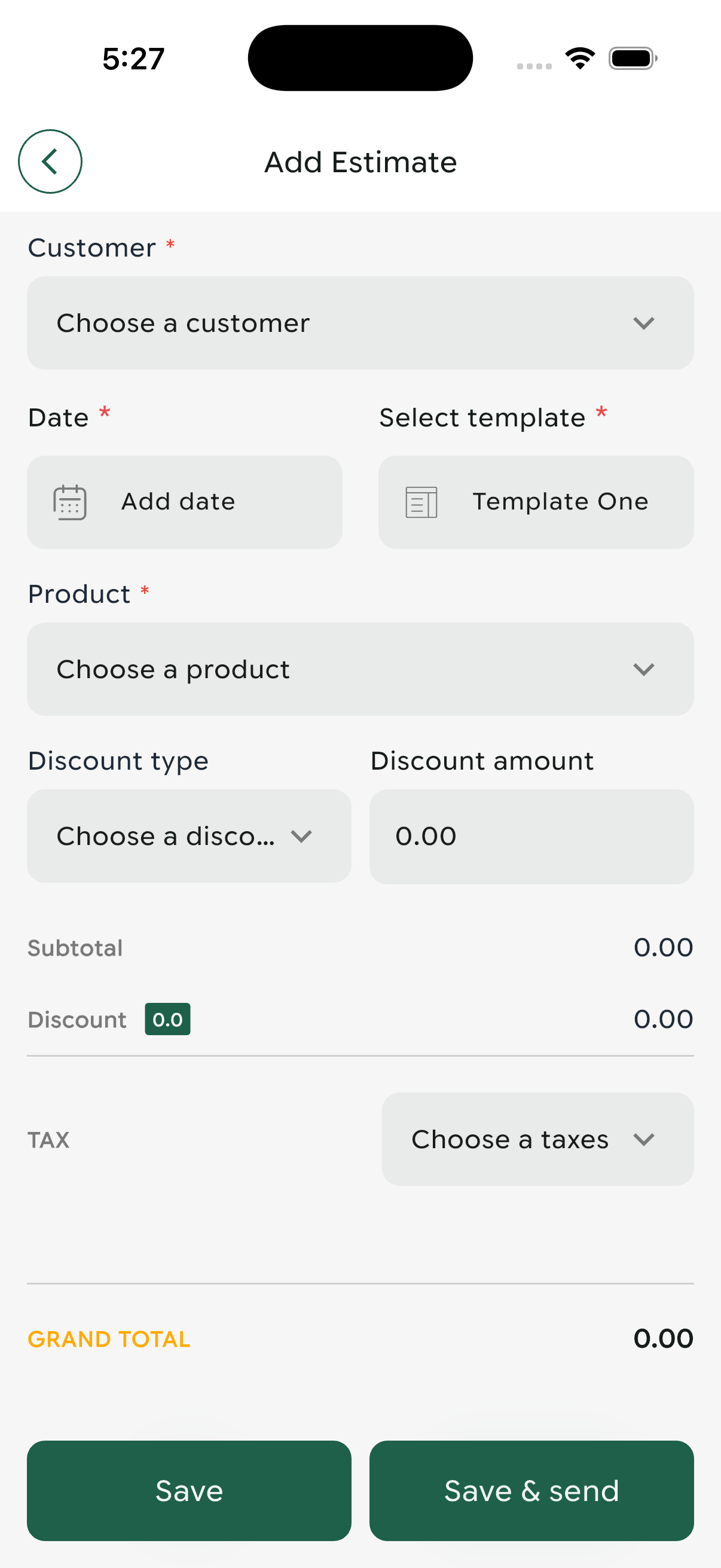
New estimate creation form with product selection
Convert approved estimates to invoices quickly to maintain momentum in the sales process. Follow up promptly on pending estimates.
Invoice Management
Create, send, track, and manage invoices with detailed billing information and payment status monitoring.
Invoice List & Overview
Comprehensive invoice management dashboard showing:
- Customer Name: Client identification
- Invoice Number: Unique ID (INV-10015, INV-10014, etc.)
- Date/Date Range: Invoice period
- Payment Status: Color-coded indicators
- Financial Breakdown: Total, Paid, and Due amounts
- View Details: See complete invoice information
- Resend: Email invoice to customer again
- Clone Invoice: Duplicate for similar transactions
- Download: Save as PDF for records
- Delete: Remove invoice (with confirmation)
Create New Invoice
Detailed invoice creation workflow:
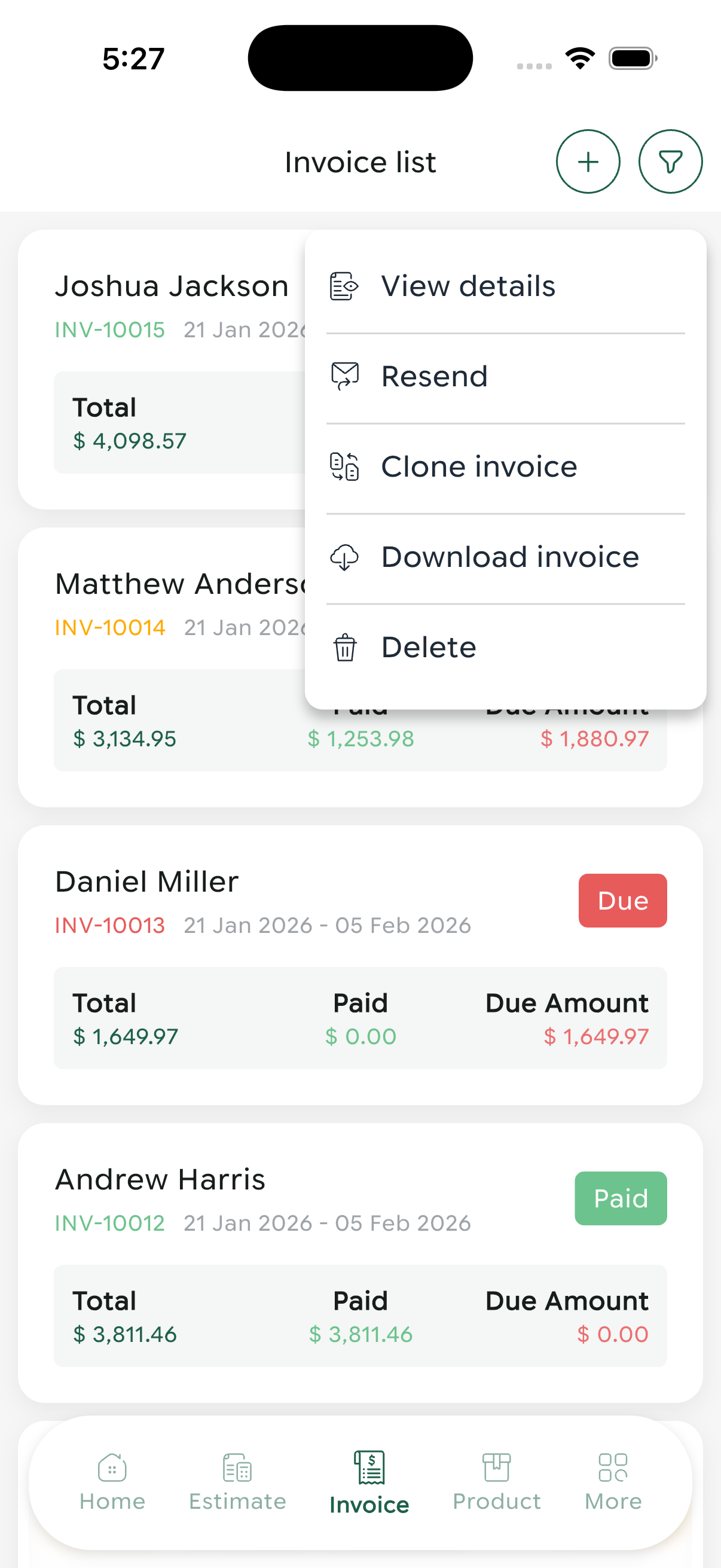
Invoice management with payment status and quick actions
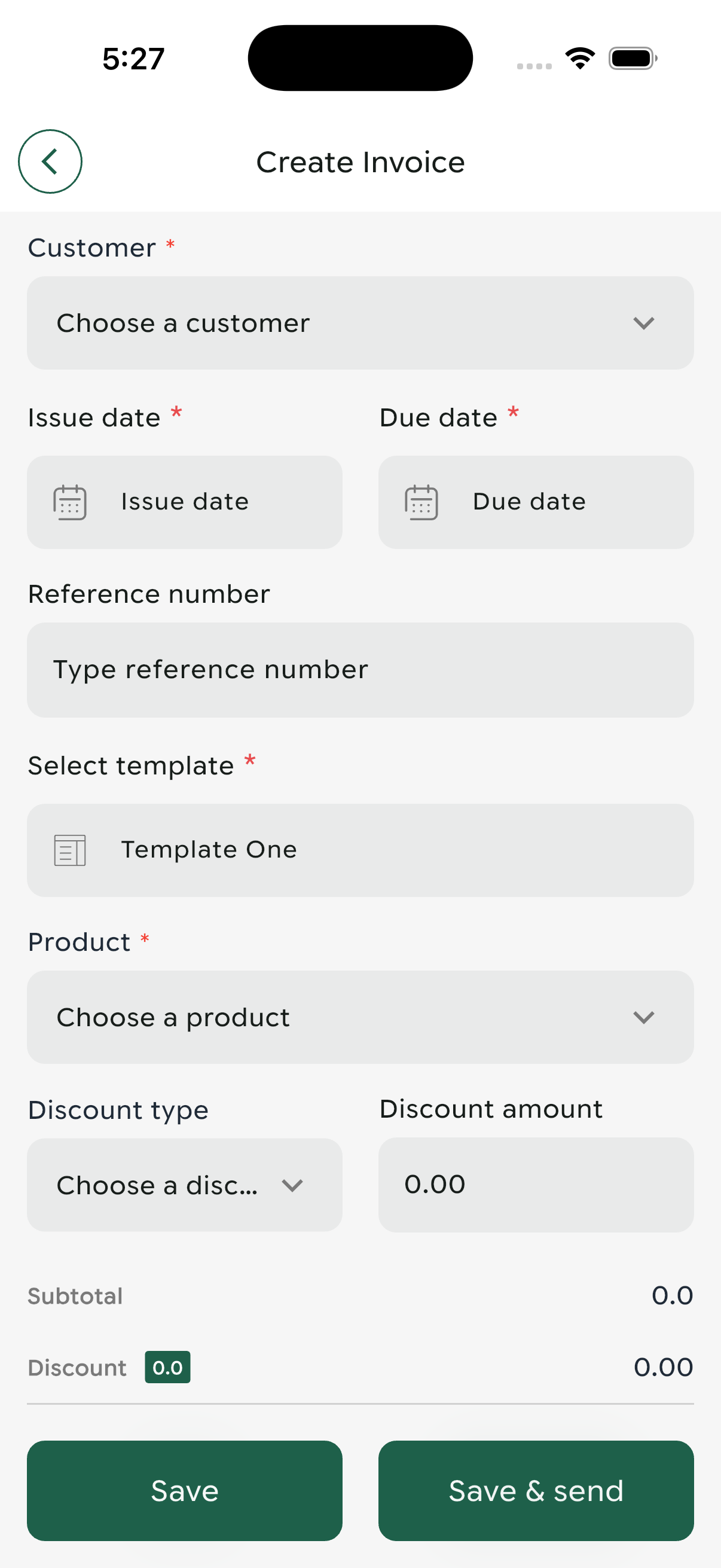
New invoice creation with comprehensive billing details
Invoice Best Practices
- Set clear due dates to ensure timely payments
- Include detailed line items for transparency
- Use professional templates that match your brand
- Send invoices promptly after service delivery
- Follow up on overdue invoices systematically
Transaction History
Complete financial transaction tracking with detailed payment records and method logging.
Transaction Records
Chronological record of all financial transactions including:
- Customer Information: Initials and full name
- Invoice Reference: Linked invoice number and date
- Transaction ID: Unique identifier (PMT10010, PMT10009, etc.)
- Amount Processed: Payment value
Recent Transaction Examples
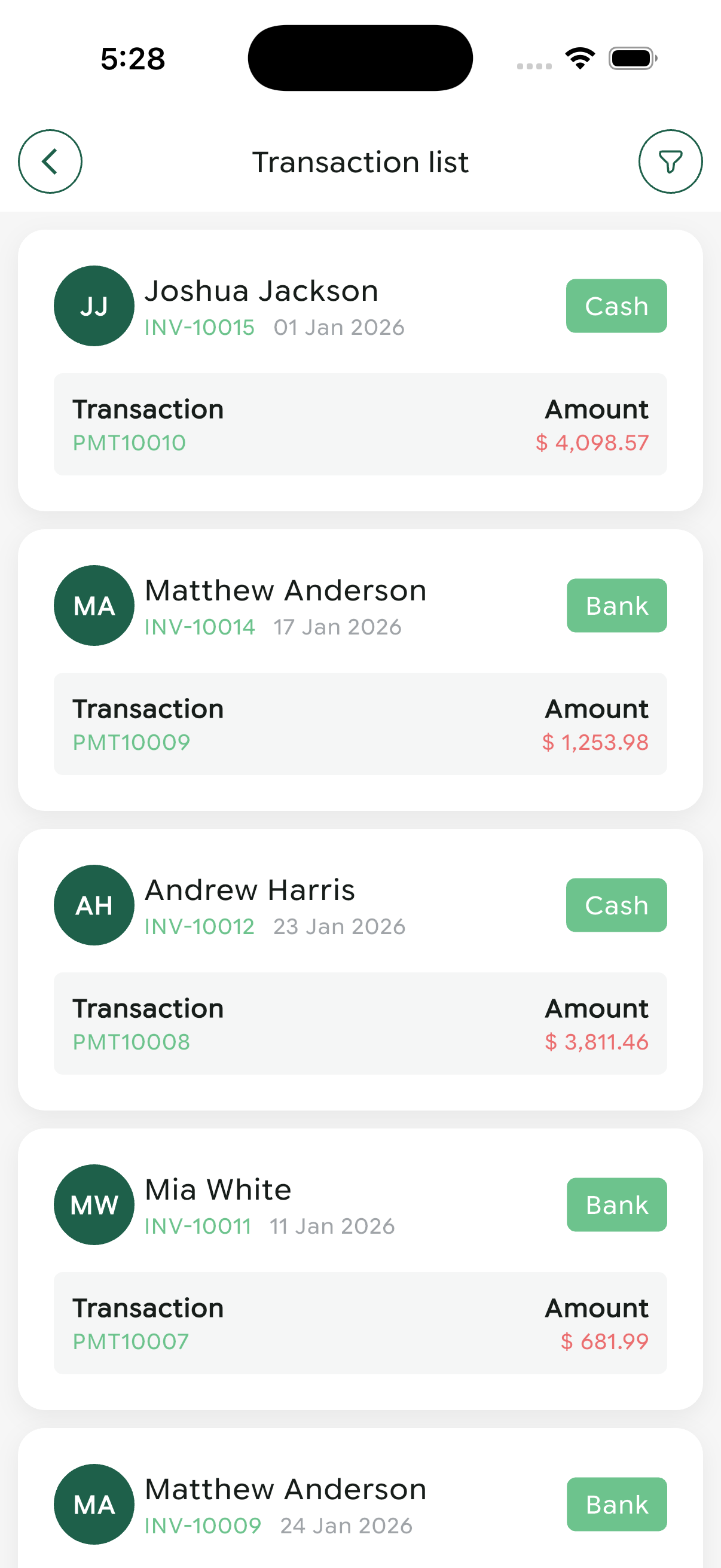
Complete transaction history with payment methods and amounts
Use transaction history to analyze payment trends, identify preferred payment methods, and track cash flow patterns for better financial planning.
Support Ticket System
Efficiently manage customer support requests, track issue resolution, and maintain high service quality.
Ticket Management Dashboard
Complete overview of support tickets displaying:
- Subject: Brief issue description
- Detailed Description: Full problem explanation
- Priority Level: Low, Medium, High urgency indicators
- Department: Technical, Billing, Sales, Operations
- Creation Date: When ticket was opened
- Requester Email: Customer contact information
Ticket Details & Conversation
Comprehensive ticket interaction interface featuring:
- Ticket ID: Unique identifier (TN00015)
- Customer Email: Requester contact ([email protected])
- Message Thread: Complete conversation history with timestamps
- Reply Functionality: Text input for responses
- Attachment Support: File sharing capability
Ticket Rating System
Collect customer feedback on support quality:
- 1-5 star rating scale
- Integrated with ticket conversation view
- Submit button for rating confirmation
- Helps track support team performance
Create New Support Ticket
Comprehensive ticket creation form:
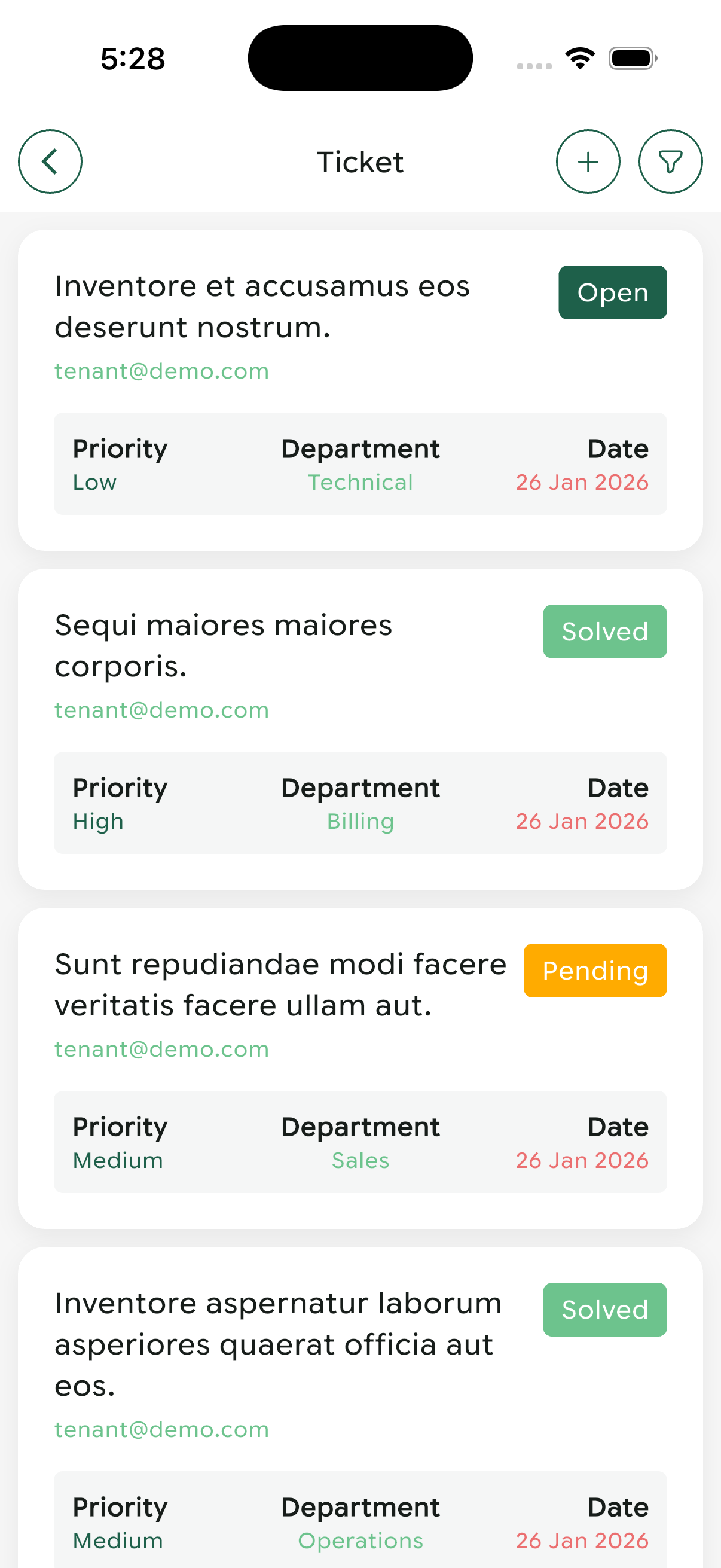
Support ticket management with priority and department filters
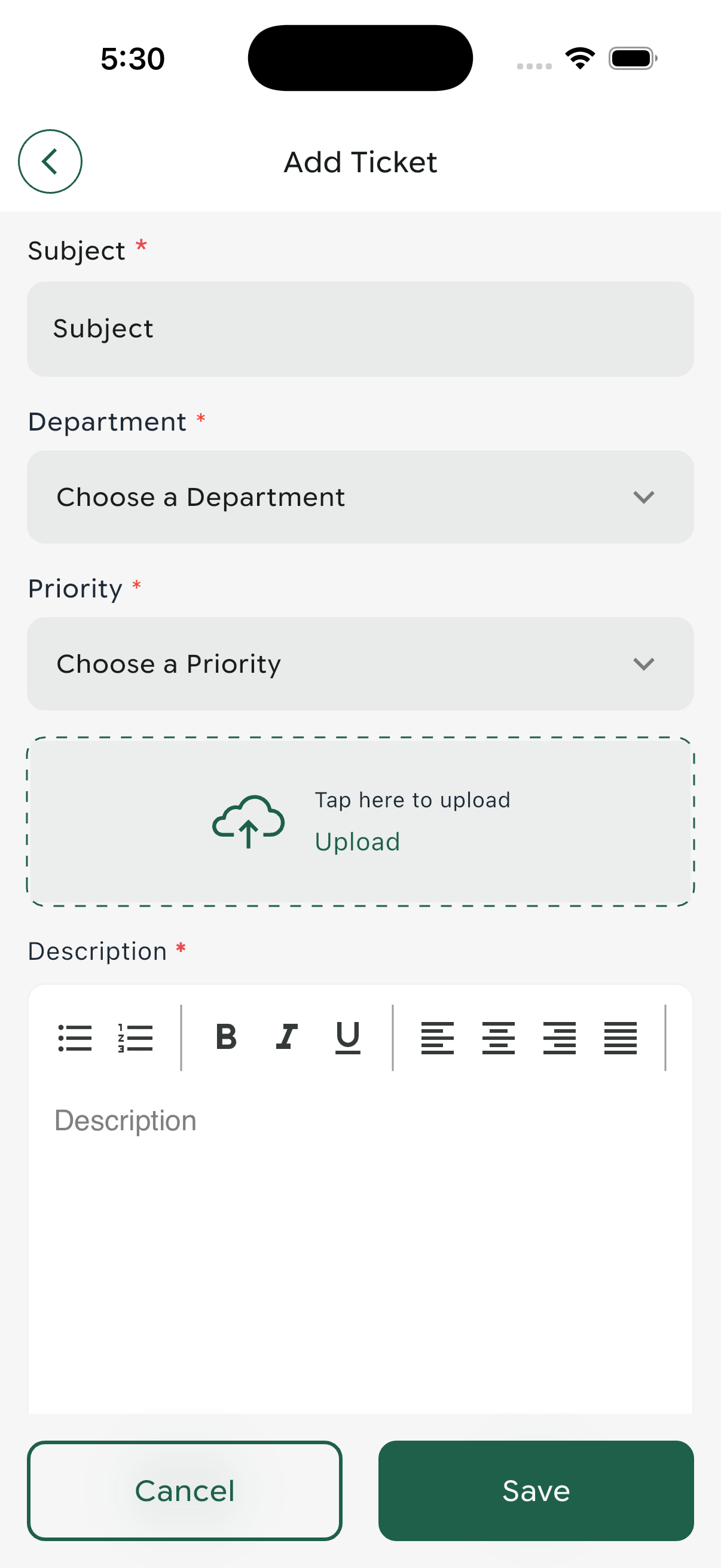
New support ticket creation with rich text editor
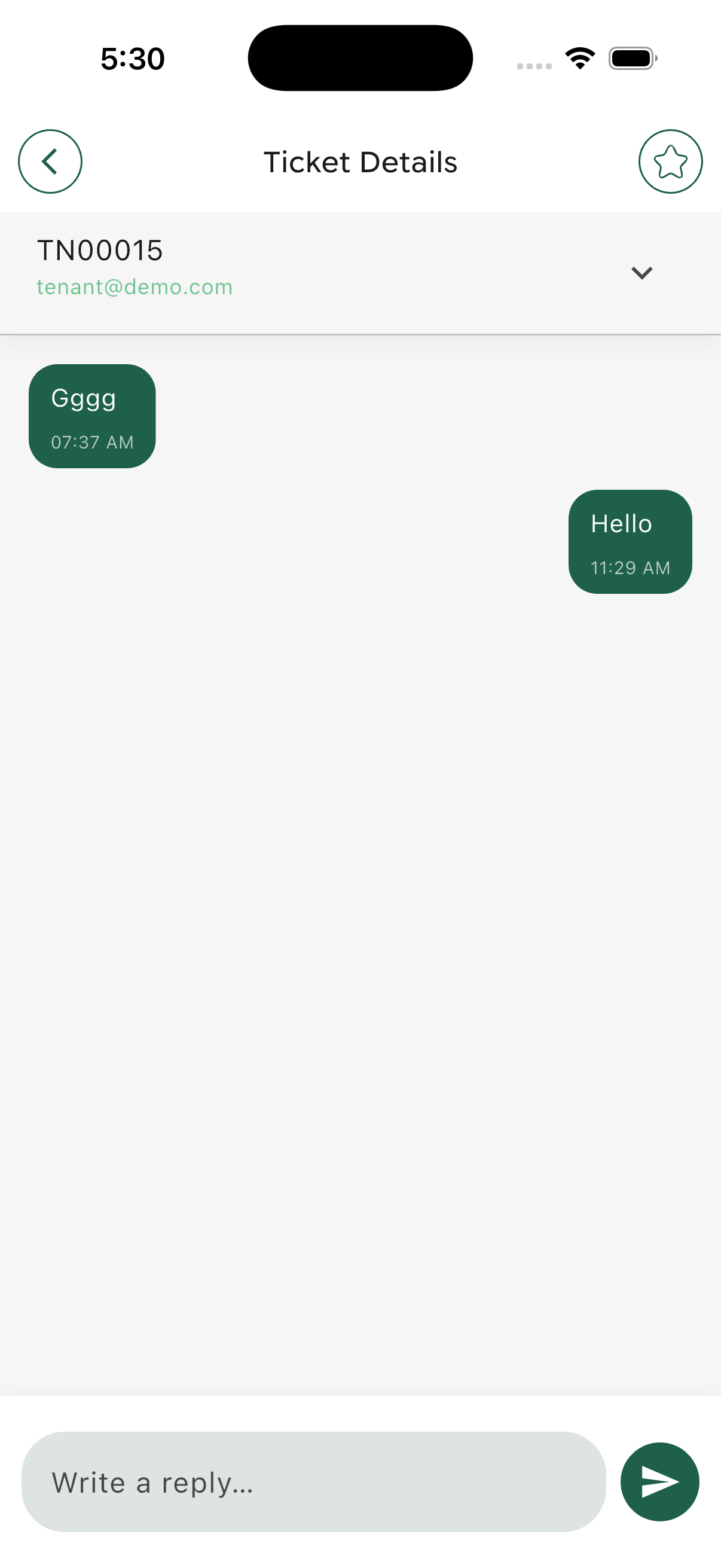
Ticket conversation thread with complete history
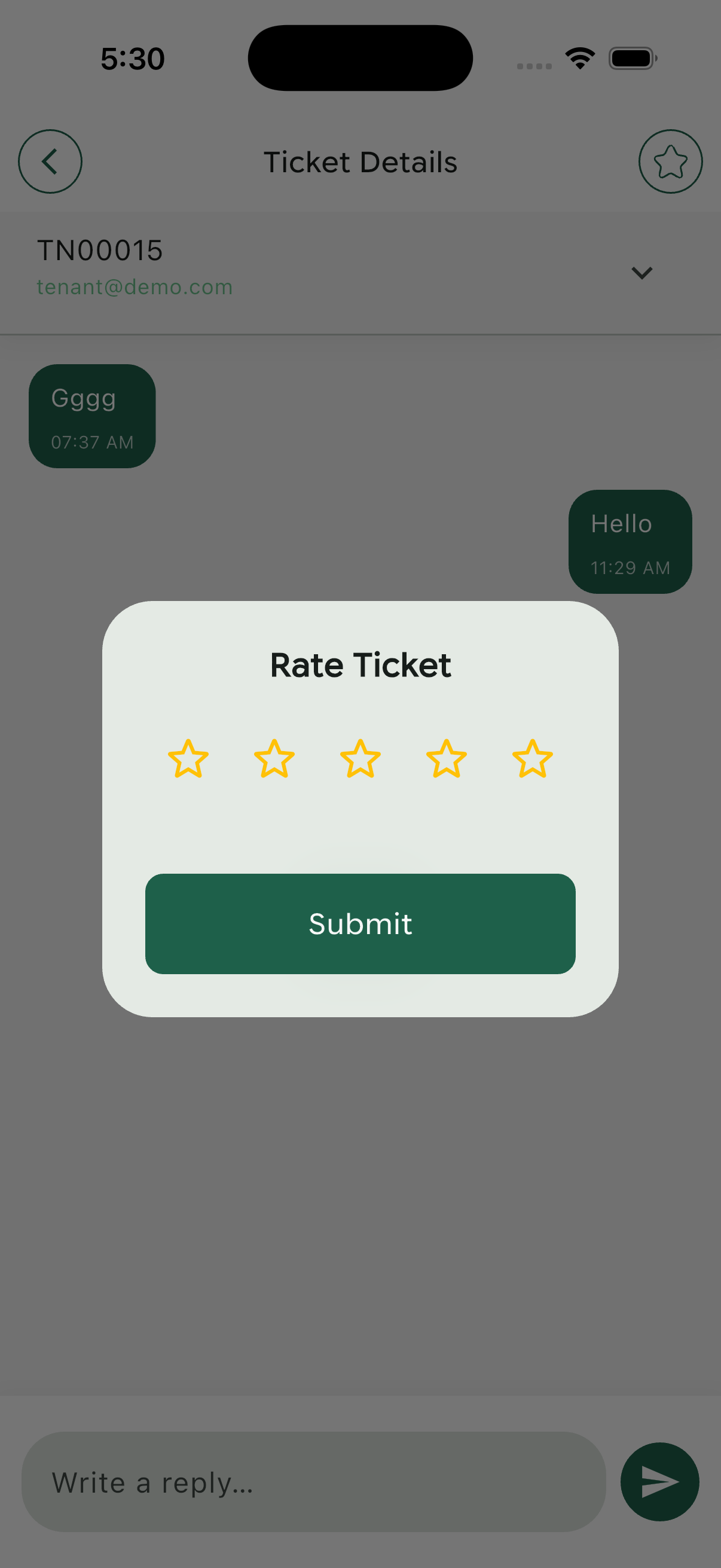
Customer satisfaction rating interface
Support Excellence Tips
- Respond to high-priority tickets within 1 hour
- Keep customers informed with status updates
- Use clear, jargon-free language in responses
- Document solutions for knowledge base building
- Request feedback after ticket resolution
Billing & Subscription
Manage your subscription plan, monitor usage, and access complete billing history.
My Plan Overview
Current subscription details and usage metrics:
- Plan Type: Business Plan
- Billing Period: 26 Jan 2026 - 25 Feb 2026 (30 days total)
- Days Remaining: 29 days (97% active)
- Days Consumed: 1 day (3% used)
- Visual Progress: Interactive usage indicators
Purchase History
Complete record of all subscription payments:
Business Plan Features
Monthly Price: $10.00
Billing Cycle Options: Monthly or Yearly
Included Features:
- Global Access - Work from anywhere
- Dashboard - Real-time business insights
- Customer Management - Unlimited contacts
- Invoice Management - Professional invoicing
- Estimate Management - Quote generation
- Transaction Tracking - Complete financial records
- Product Categories - Organized catalog
- Product Units - Flexible inventory
- Products Management - Full control
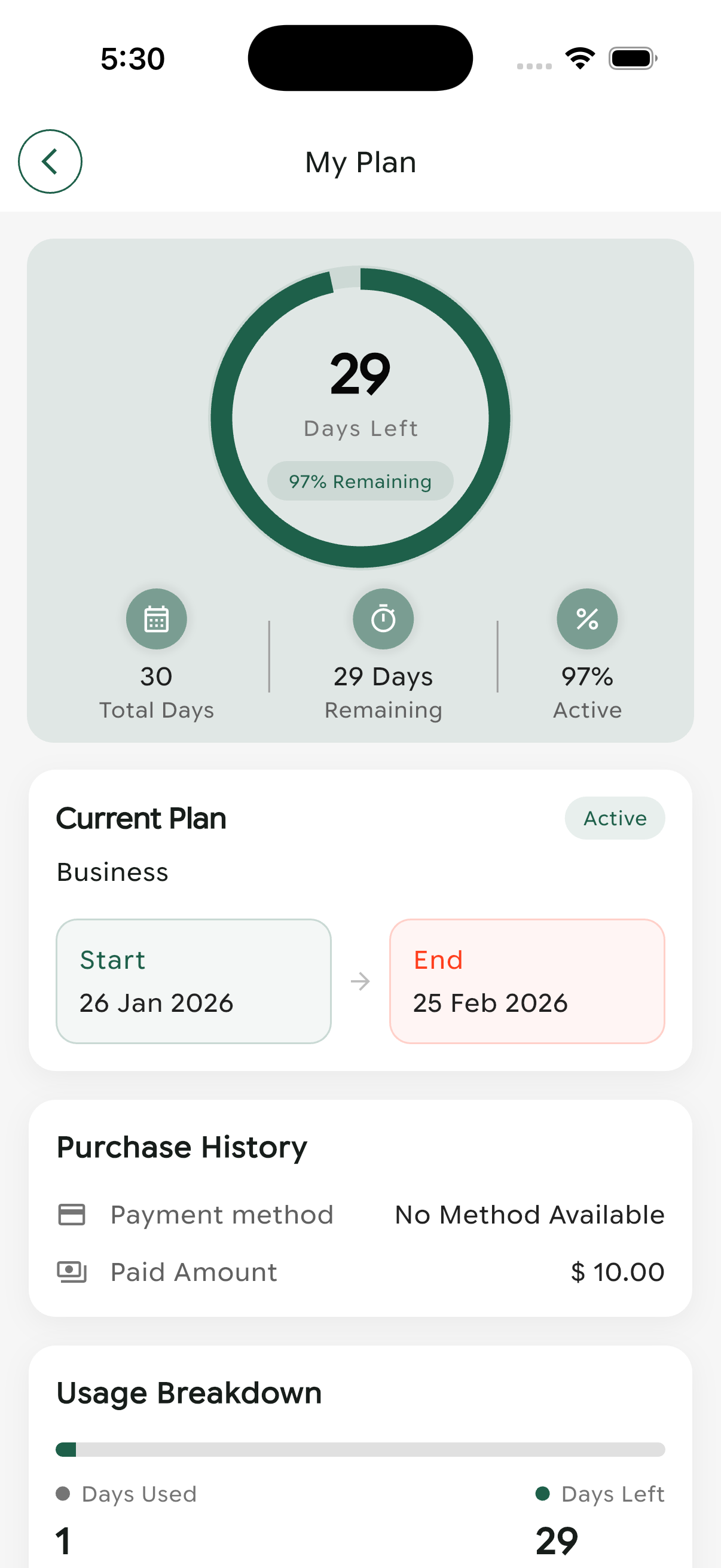
Active subscription details with usage statistics
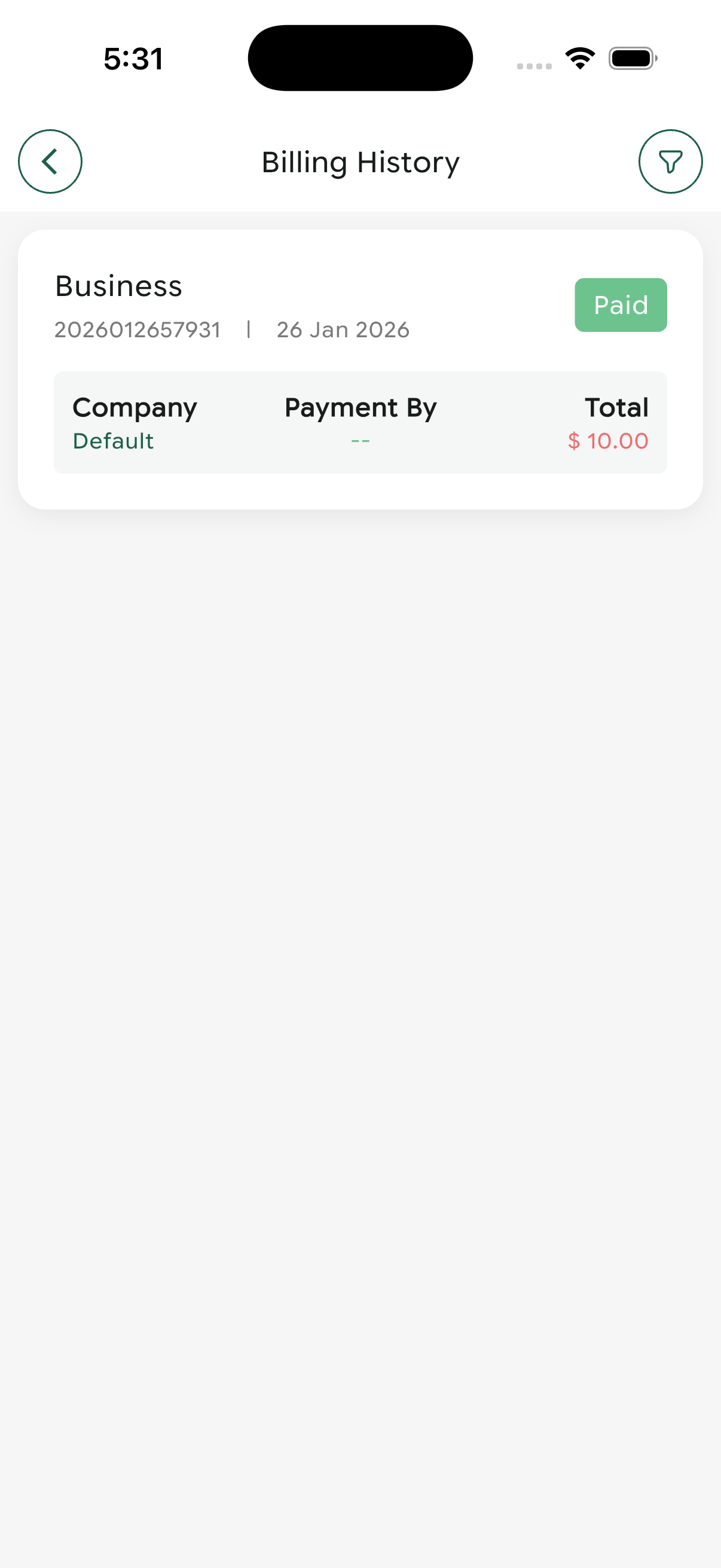
Complete billing transaction history
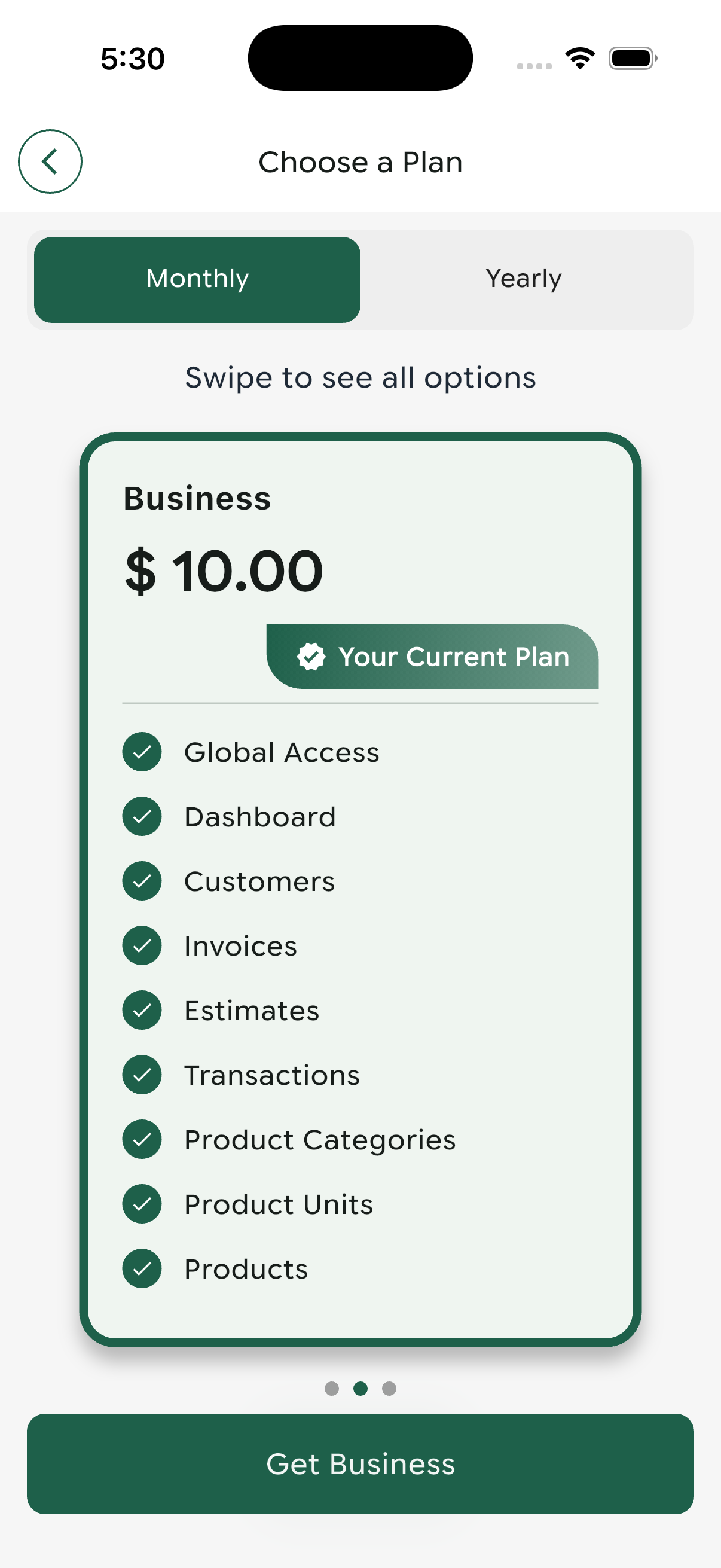
Plan selection with feature comparison and pricing
User Profile Management
Manage your personal information, account security, and application preferences.
Profile Information
Current user account details:
- Name: Jack Smith
- Email: [email protected]
- Account Type: Subscriber
- First Name: Jack
- Last Name: Smith
- Gender: Not set (optional field)
- Phone: Not set (optional field)
- Address: Not set (optional field)
Edit Profile
Update your personal information:
Change Password
Secure password update process:
- Current Password: Verify your existing password
- New Password: Enter your new secure password
- Confirm Password: Re-enter new password for verification
- Click "Change Password" to save
Use a strong password with at least 8 characters, including uppercase, lowercase, numbers, and special characters.
Language Settings
Available language options:
- English (Default)
- Arabic (العربية)
Select your preferred language for the application interface.
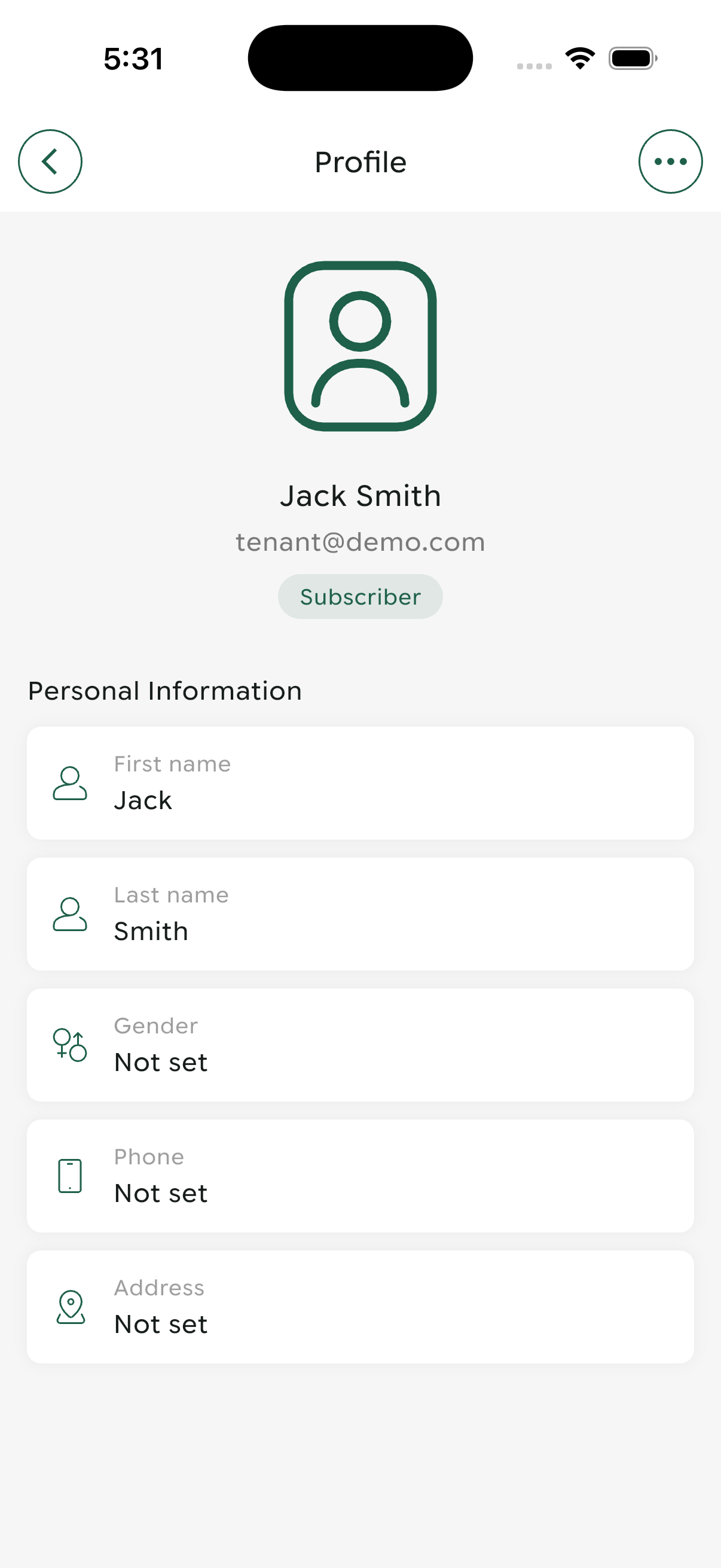
User profile overview with personal information
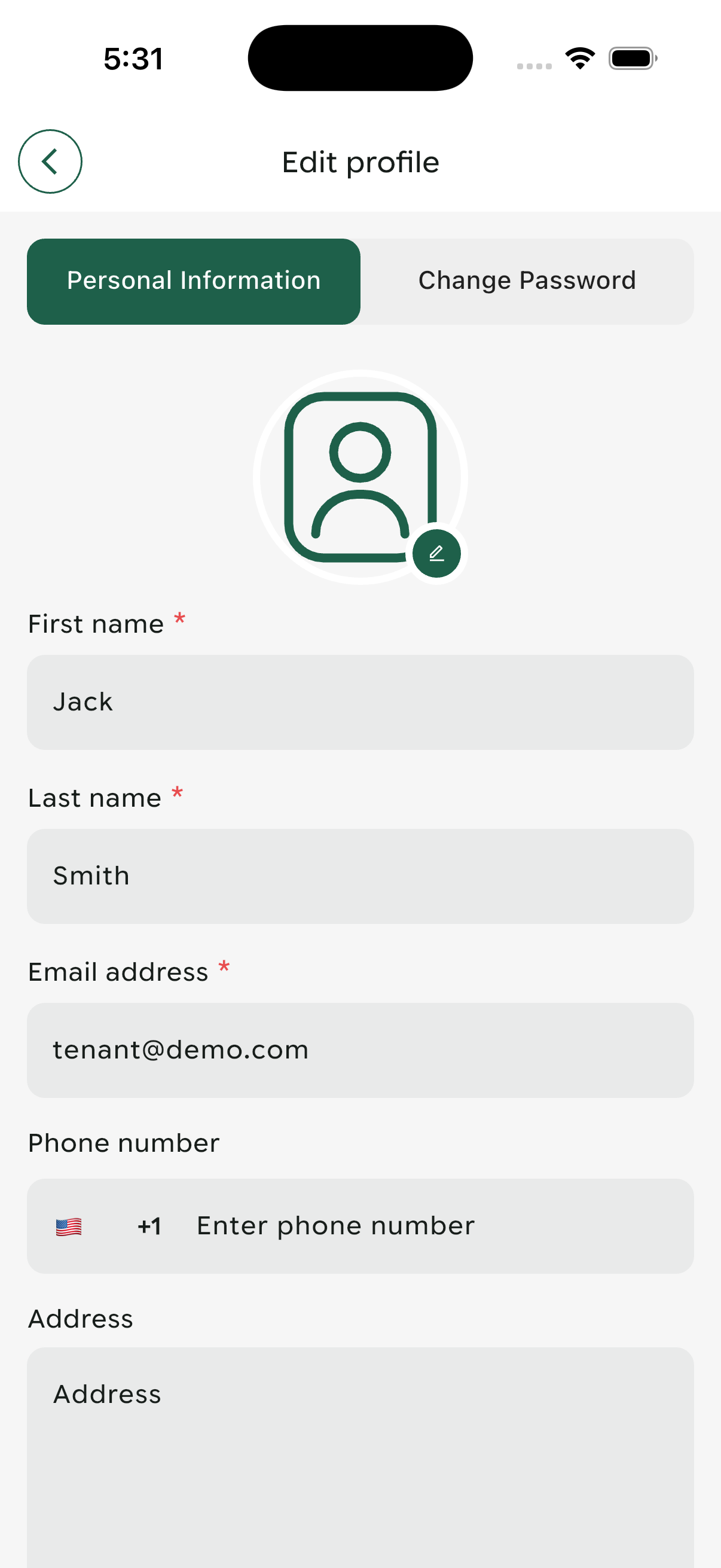
Profile editing interface with form fields
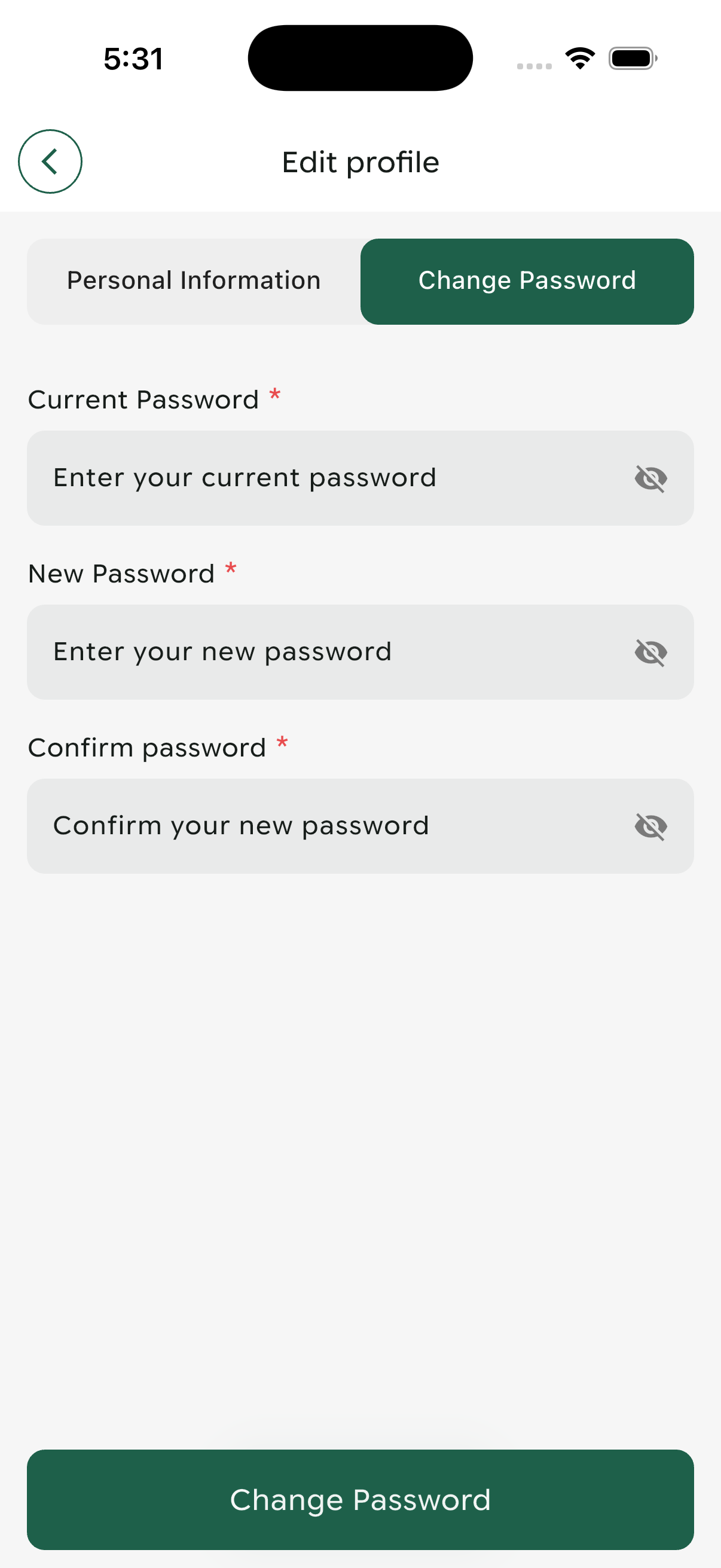
Secure password change form

Multi-language selection interface
Authentication & Security
Secure login, registration, and password recovery functionality to protect your account.
Login
Secure access to your PaySuite account:
- Email Address: Your registered email
- Password: Your secure password
- Keep me logged in: Stay signed in on this device
- Login Button: Access your account
- Sign Up Link: Create a new account
- Forgot Password: Recover account access
Only use "Keep me logged in" on your personal devices. Always log out on shared or public device.
Customer Registration
Create your PaySuite account:
Forgot Password
Recover access to your account:
- Click "Forgot Password" on login screen
- Enter your registered email address
- Click "Send Reset Password"
- Check your email for reset instructions
- Follow the link to create a new password
- Return to login with your new credentials
Check your spam folder. If still not found, ensure you entered the correct email address and try again.
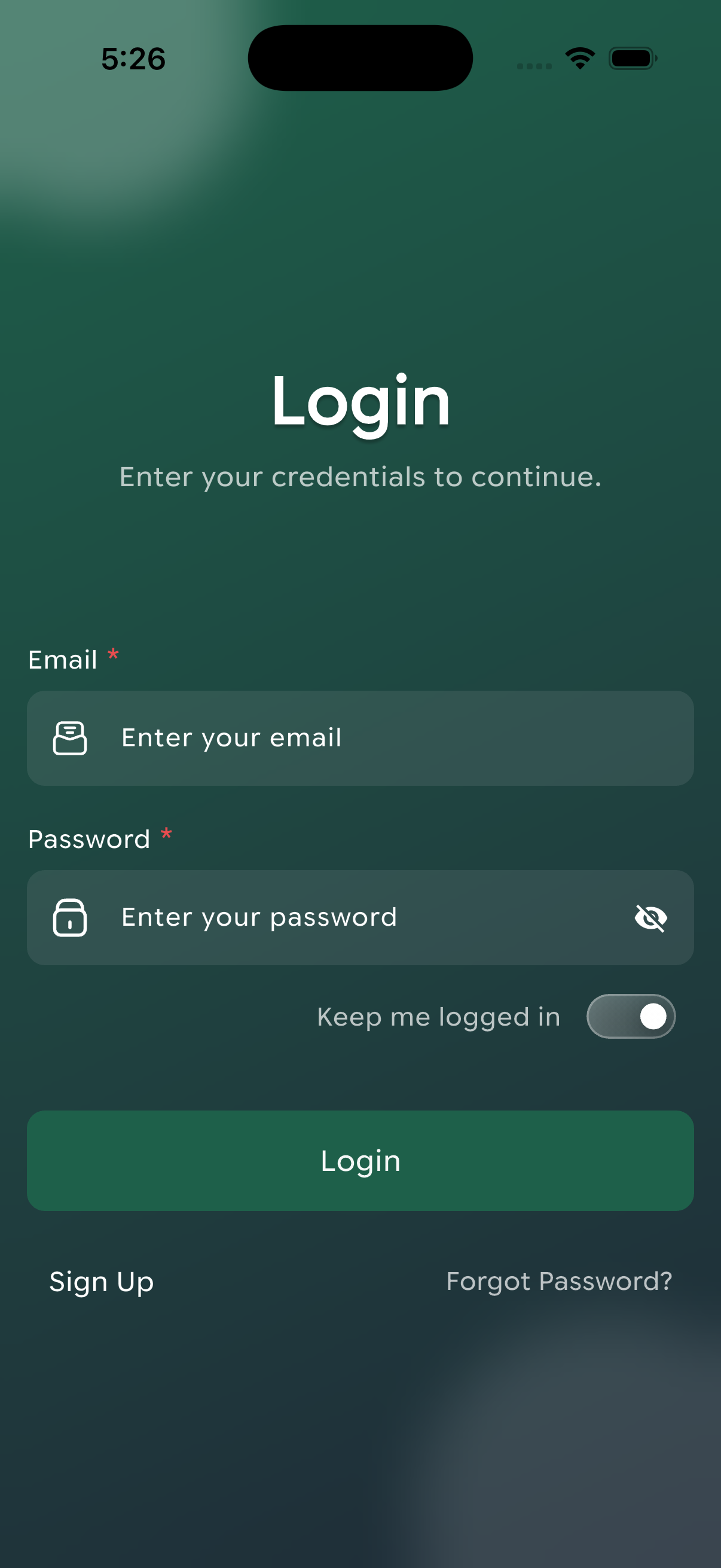
Secure login interface with remember me option
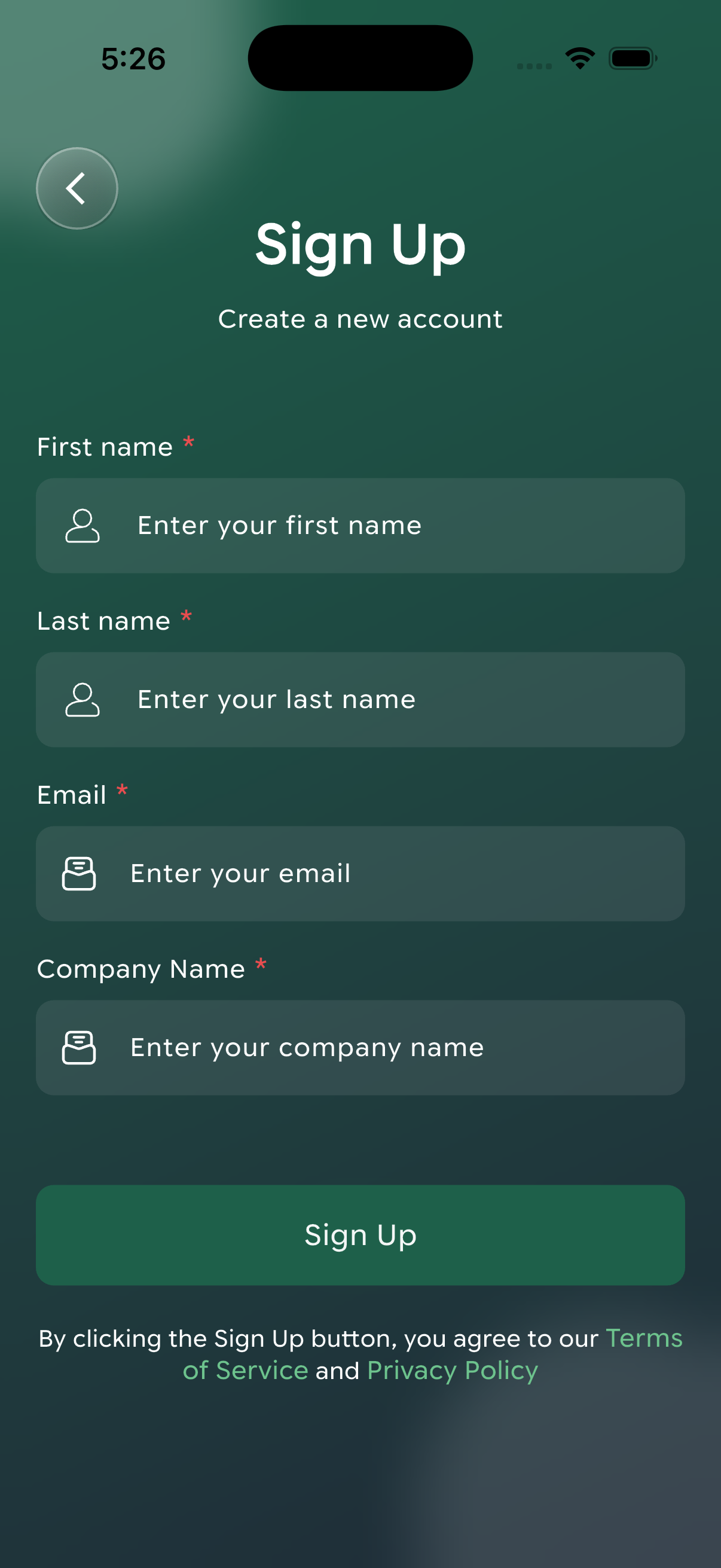
New account registration with company details
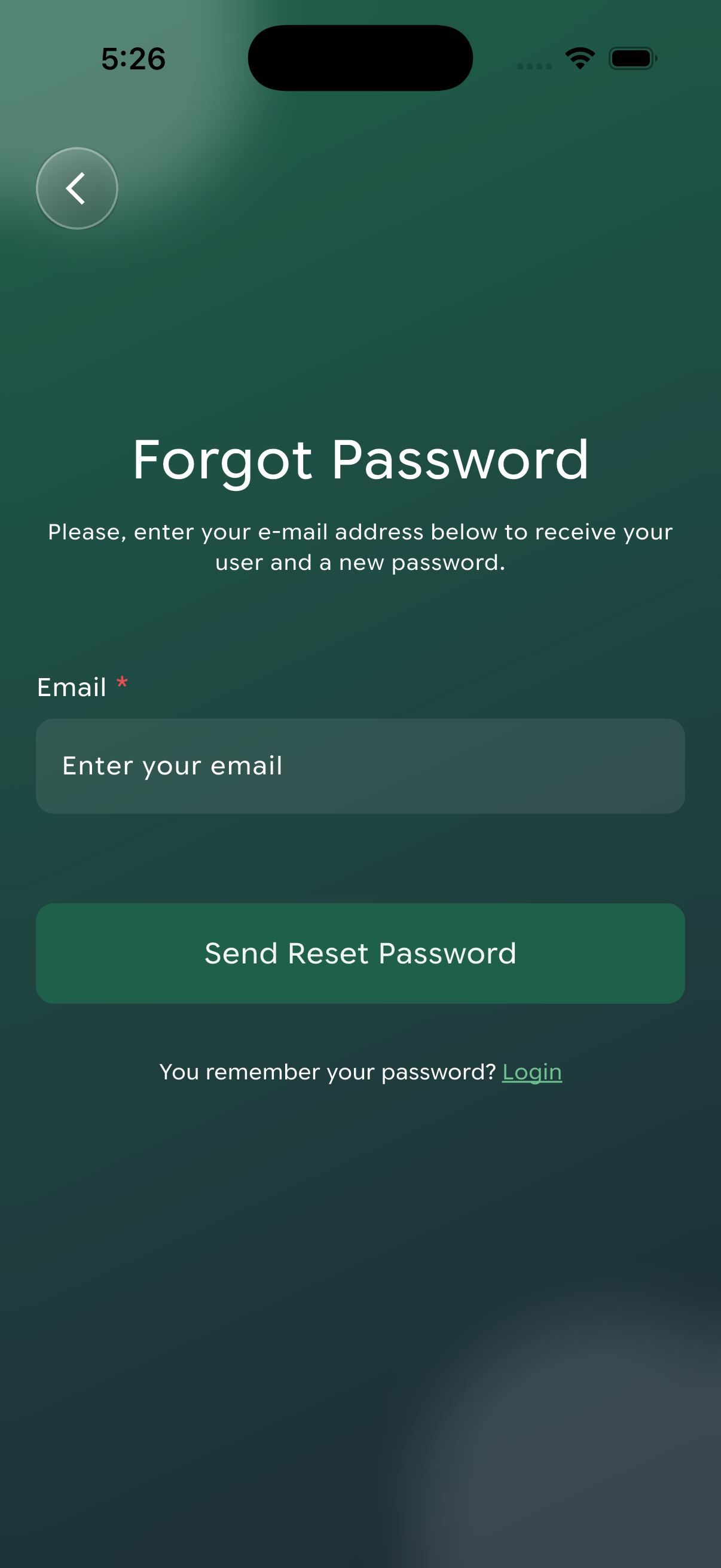
Password recovery email request form
Account Security Best Practices
- Use a unique, strong password for your account
- Never share your login credentials
- Log out after each session on shared devices
- Update your password regularly (every 3-6 months)
- Enable two-factor authentication if available
- Monitor your account for suspicious activity
You now have a complete understanding of all PaySuite mobile app features. Start managing your business more efficiently today!
- Download the app from App Store or Google Play
- Create your account or log in
- Set up your business profile
- Start creating invoices and managing customers
- Explore advanced features as you grow
- Check out the Android Installation Guide
- Review the iOS Installation Guide
- Contact our support team for assistance to email :
[email protected]